

Wedding invitations are one of those purchases that seem simple until you start shopping. Suddenly, you’re comparing paper textures, debating floral borders, and wondering what information even needs to be on them.
VistaPrint wedding invitations give you a place to start with editable designs and printing options. The trick is choosing an invitation that feels like you, includes what your guests need, and fits your budget. Oh, and it would be great if you have time to order some free samples to feel the paper stock!
Here’s how I’d approach the order, from narrowing down templates to finding a VistaPrint invitation coupon before checkout.
Wedding Invitation Ideas to Suit Your Style
Best VistaPrint Invitation Coupon:
Before you order, take a look at our latest VistaPrint promo codes and free shipping offers to see what you could save on your invitations.
Check that the offer includes your chosen design and any upgrades, then compare the total with shipping. The biggest percentage off isn’t always the best deal! Make sure the discount shows up in your cart before you pay as codes can have exclusions.
How to Choose VistaPrint Wedding Invitation Templates

Start with two or three words that describe your wedding: garden and relaxed, classic and formal, or colorful and playful.
Then browse VistaPrint wedding invitation templates with that direction in mind. The gallery lets you narrow designs by options such as color, style, size, and finish. Save a small shortlist before editing. It’s easier to compare three favorites than to keep reopening twenty tabs!
Here are a few themes I’d consider:


| Your wedding’s feel | A design direction to explore | What to check |
|---|---|---|
| Garden celebration | Florals or greenery | Does the artwork leave room for the wording? |
| Formal evening | Restrained colors and elegant lettering | Are the practical details easy to read? |
| Relaxed outdoor gathering | Warm tones and a simple layout | Does the design suit the setting? |
| Modern celebration | Bold names and generous blank space | Will longer names fit comfortably? |
These are starting points, not rules. You don’t need a barn illustration just because you booked a barn, haha! Also, if you are printing any matching posters, check out this article first.
Tip: Add your actual names and venue details early. A template can look lovely with short sample text and feel crowded once your information goes in. Use the template as a starting point, then check which options are available for your chosen invitation.
Which Paper Should You Choose?
Paper is really hard to judge on a screen. VistaPrint’s listed options include matte, glossy, pearl, linen, and uncoated stocks, although availability depends on the invitation.

In plain English:
- Matte has a subdued finish
- Glossy has a shiny-coated front
- Pearl adds shimmer
- Linen has a woven texture
- Uncoated stock has a less shiny feel
Which is best for you? I’d use the free wedding samples to make the decision. Try reading the text under a lamp, look at the colors by a window, and handle each card.
If you’re considering foil, check the design preview and product description carefully. A gold-colored graphic and an actual foil finish definitely aren’t the same.
Tip: You also don’t have to upgrade every wedding invitation. Decide where an upgrade matters most to you, then price the full order.
Check the VistaPrint Invitation Size and What’s Included
VistaPrint offers wedding invitations in sizes including 5 × 7, 4.6 × 7.2, and 6 × 9 inches, with envelopes and printing on the back included.
When choosing a size, think about how much you need to say. If the wording feels crowded, a separate details card can give your invitation a little breathing room and make everything easier for guests to read.
Before adding extras, make a “must-have” list. Your invitation needs to get guests to the right place at the right time. An enclosure may be useful for travel details, but every piece should earn its place in the envelope.
Have some great engagement photos? Print them on canvas with Easy Canvas Prints; we have a great coupon here!
How Much Will Your Invitations Cost?
On VistaPrint, custom wedding invitations generally cost between $0.80 and $1.75 per invitation depending on your bulk quantity, paper choices, and active discounts.
Once you’ve found a design you love, choose your paper, quantity, and any upgrades to see what it will actually cost. That tempting starting price may look different once you add matching cards, upgrades, and special finishes.
Remember to budget for any extra cards, upgraded envelopes, shipping, tax, and postage. Divide the total by the number of households or guests you’re mailing to, and you’ll know what each complete invitation costs. Oh, and obviously use a coupon to save up to 50%!
Over budget? Try trimming a few extras before saying goodbye to your expensive favorite design. You might love it just as much with simpler envelopes or one less enclosure.
What Should Your VistaPrint Wedding Invites Say?
Write the essential information before fussing with fonts:
- Your names.
- An invitation to celebrate.
- The ceremony date and time.
- The venue name and location.
- Reception details, if needed.
- How and when to RSVP, either on the invitation or a separate card.
Here’s an example of what that might look like on VistaPrint wedding invites:
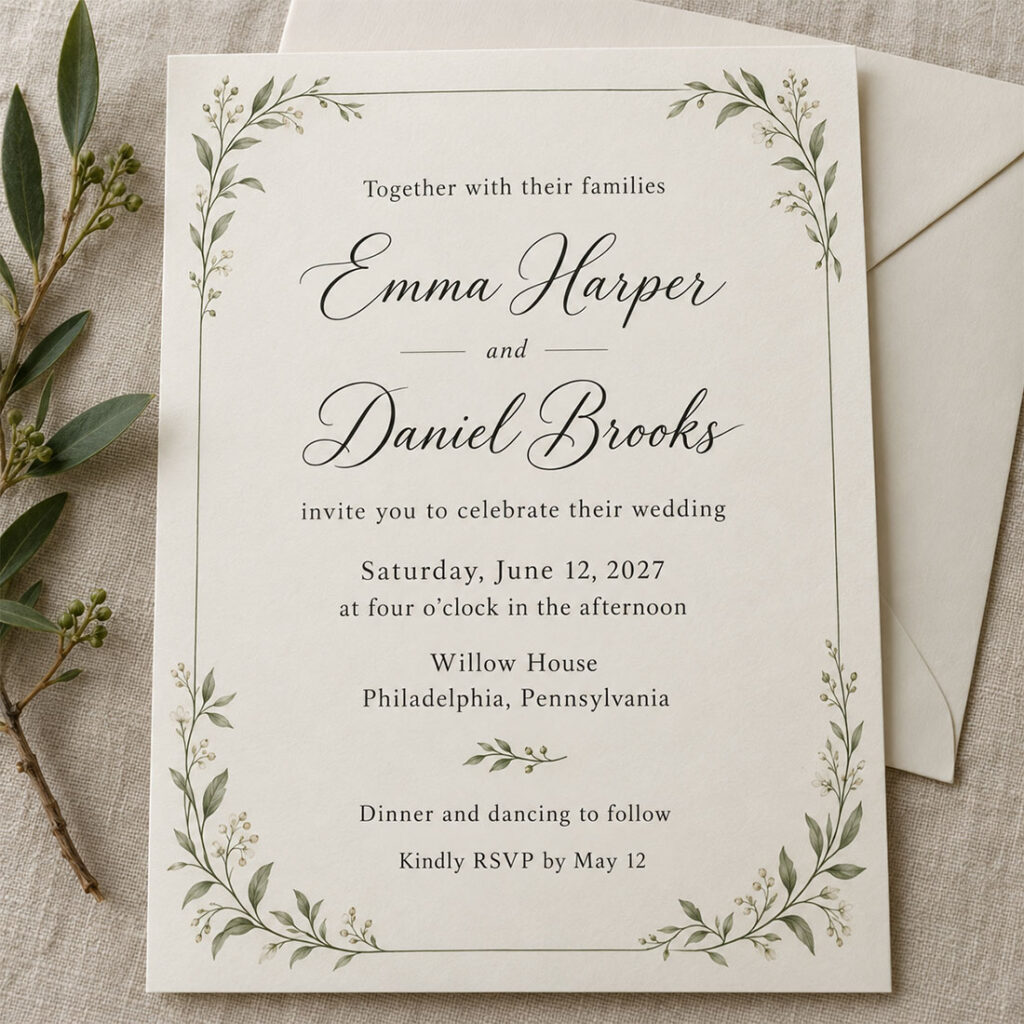
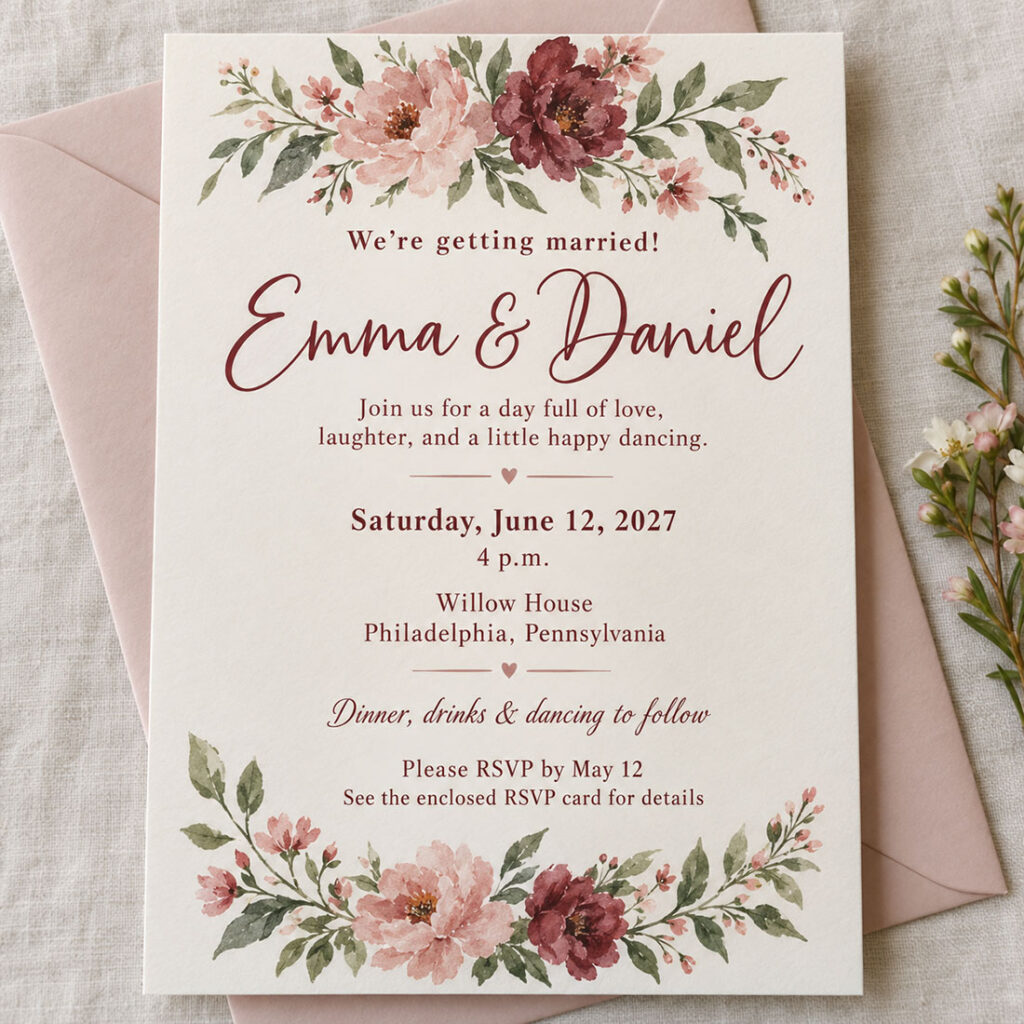
Put the RSVP deadline and response instructions wherever guests can find them easily.
When editing VistaPrint wedding invites, resist shrinking the practical details to preserve a decorative layout. Beautiful lettering still needs to be readable!
Tip: VistaPrint’s wedding invitation design guide offers more ideas for balancing wording, fonts, and imagery.
Can You Upload Your Own Wedding Invitation Design to VistaPrint?
Yes. VistaPrint offers an upload-your-own-design option.
If you’re using a design made elsewhere, check the selected invitation’s specifications before exporting. Make sure the dimensions match, keep important wording away from the trim edge, and inspect the uploaded preview.
For photo invitations, use the original image rather than a screenshot. For a QR code, test a printed version at the intended size and include a readable website address as a backup.
Envelopes and Addressing: A Useful Time-Saver
VistaPrint offers free envelope addressing with eligible purchases. You can choose recipient addresses, a return address, or both.
There’s a restriction worth knowing: addressing is available on custom envelopes and printed white envelopes, rather than colored blank or white blank envelopes.
Follow VistaPrint’s address-list instructions and preview each envelope. Check names, apartment numbers, ZIP codes, and who’s included in each invitation.
Tip: The addressed envelopes arrive with your order for you to fill and mail. Address printing doesn’t mean postage or mailing is included.
How Many VistaPrint Wedding Invitations Should You Order?
Count invitations by mailing group rather than automatically ordering one per guest. A couple or household may share an invitation, while other guests need separate ones.
For example, 100 guests might mean 60 mailing groups. If you choose five extras for keepsakes or last-minute additions, you’d need 65 invitations, subject to the quantities available for your selection.
Tip: Make the mailing list first. Guessing from the head count can leave you with a surprisingly large pile of leftover wedding invitations.
Give Yourself Time to Check the Order
Work backward from when you want invitations in the mail. Allow time to choose samples, finalize details, review the design, receive the order, and assemble the envelopes.
VistaPrint lets you download a digital proof from its design studio. Share it with your partner or a friend before approving it; a fresh pair of eyes can catch a date or spelling mistake you’ve stopped noticing. VistaPrint
Confirm the arrival estimate at checkout, then leave breathing room to inspect the printed cards.
Did you know? Queen Victoria’s wedding cake weighed 300 pounds. One of the cakes made for Queen Victoria and Prince Albert’s 1840 wedding weighed a whopping 300 pounds and measured about three meters around. And you thought your wedding cake order was too much?
VistaPrint Wedding Invitations FAQs
VistaPrint currently advertises included envelopes on its wedding invitation page. Confirm the envelope selection and any upgrade charges before checkout.
Yes. Add your wording and review the editing options available in the selected template.
Compare our promo code specifically for wedding invitations against the other featured coupons at checkout and use the one that saves the most on your order.
Ready to Create Your VistaPrint Wedding Invitations?
Choose a design you love, compare the paper samples, and give the wording one last careful read. Then check our latest VistaPrint promo codes before ordering, saving a little on invitations leaves more room for the celebration!

I’m a dad of four, including 3 kids and a Hungarian Vizsla who is my partner about 22 hours a day. I’m a Philly sports fan and enjoy writing about wellness, saving money, and personal finance. Thanks for reading!