

A poster has a pretty simple job: get someone to notice something. Maybe it’s your bakery’s grand opening, a school concert, or a sale that deserves more attention than a handwritten sign taped to the door.
Ordering VistaPrint posters starts with a few choices: size, paper, design, and quantity. Getting those choices right can matter more than finding the biggest advertised discount. A bargain poster that’s too small to read isn’t much of a bargain.
Here’s how to plan your VistaPrint poster order, avoid common design mistakes, and check for savings before you pay.
Best VistaPrint poster promo code: Check before you order!
Before you order, take a look at our latest VistaPrint promo codes and free shipping offers to see what you could save. Compare the final total, including shipping, to find the best deal for your posters.
Just check the fine print, as a discount on “marketing materials” might not include every type of poster. Make sure the code applies to your order and the savings show up in your cart before you pay.
My money-saving tip: Try not to procrastinate, as all VistaPrint poster orders over $100 qualify for free economy shipping, but that can take a while to arrive!
How to make a great VistaPrint poster:
While the design is most important, choosing the right poster size also matters.
Which VistaPrint poster size should you choose?
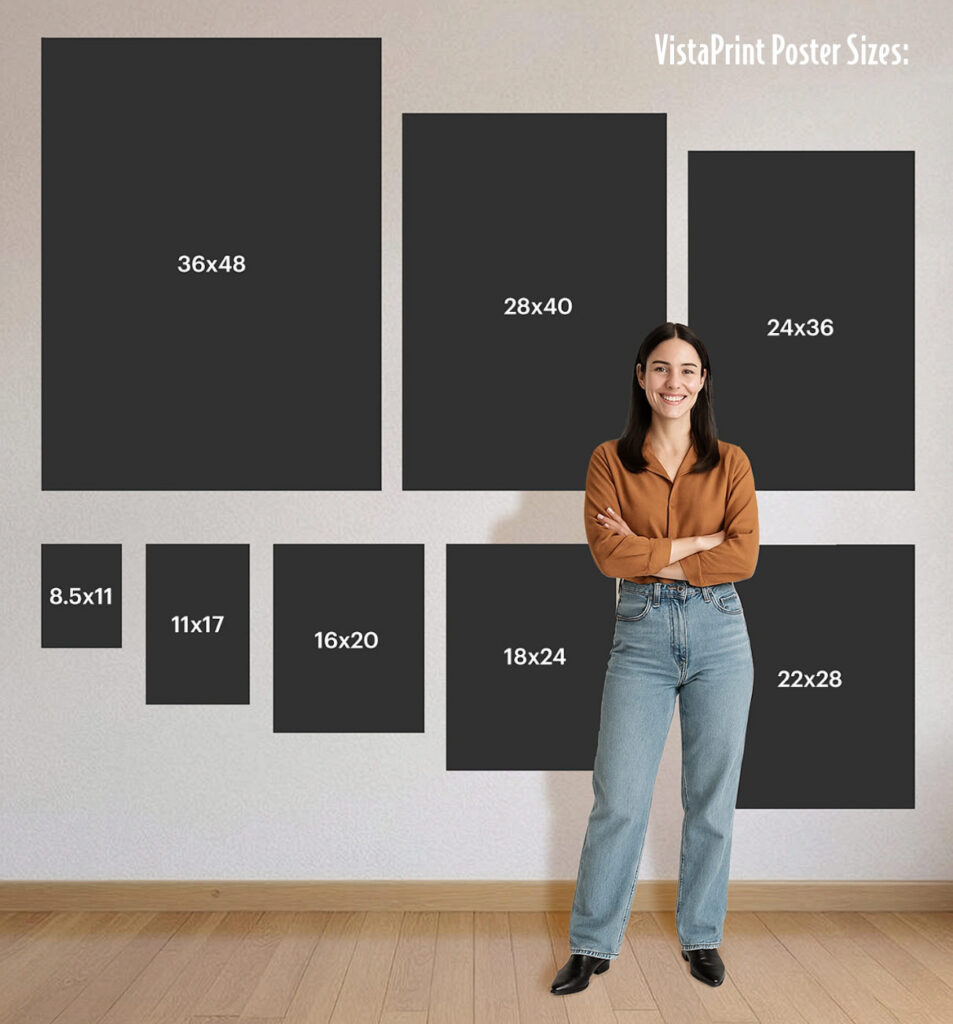
Start with the space where your poster will hang. Measure the wall, window, display board, or frame before choosing a size. It’s surprisingly easy to picture a large poster and accidentally order something closer to a desk sign.
VistaPrint’s custom poster page lists all size options, including popular 11×14, 12×18, 18×24, and 24×36 sizes. Here are practical starting points for those sizes; the uses below are suggestions rather than manufacturer requirements.
| Poster size | Where I’d consider using it | Design priority |
|---|---|---|
| 11 × 14 inches | A small indoor notice or framed display | A brief message people can read nearby |
| 12 × 18 inches | A compact event announcement or promotion | One headline and the essential details |
| 18 × 24 inches | A shop display or community event board | A clear visual with readable supporting text |
| 24 × 36 inches | A larger window display or event promotion | A bold headline that carries from farther away |
Buying a frame? Choose it first. An inexpensive print can become a more expensive project if you need an unusual frame size. Check the frame’s actual opening, too: its edges may cover part of your design.
Tip: A design made for one poster size may crop awkwardly at another. For example, 18 × 24 has a 3:4 aspect ratio, while 24 × 36 has a 2:3 ratio. Moving between them can require redesigning the layout rather than simply enlarging it. Check the preview for clipped logos, squeezed text, or unexpected white borders after changing sizes. Get started here!
VistaPrint Matte or glossy posters: What makes sense for your project?
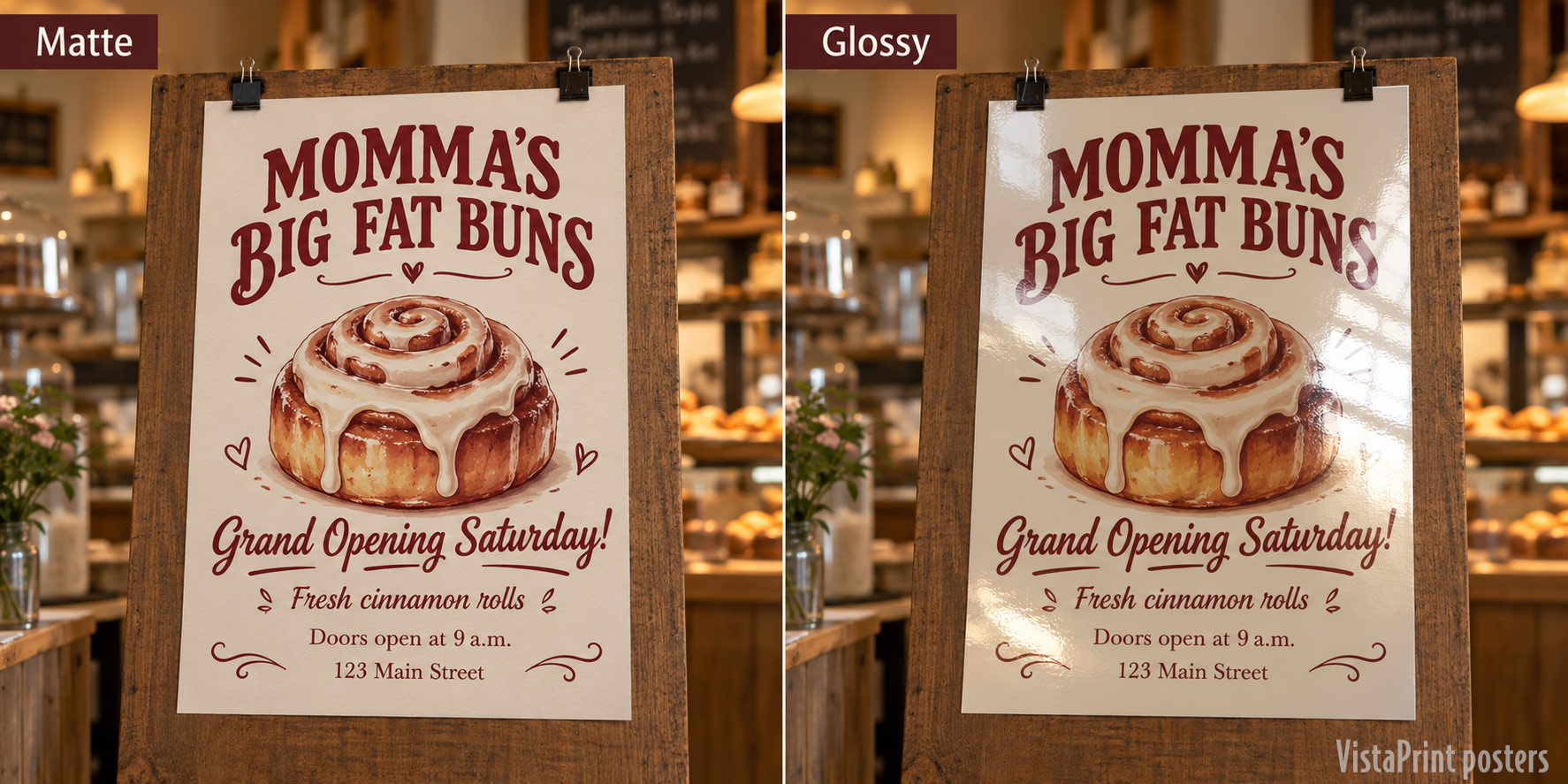
Think about lighting and how people will view the poster. As a general buying guideline:
- Matte is worth considering for text-heavy designs or displays where reflections would be distracting.
- Glossy is worth considering for photo-led designs where you want a shiny finish.
For a café menu or information-heavy school poster, I’d start by considering matte. For a colorful product photograph, I’d compare a glossy option. A finish alone won’t rescue a dark photo or tiny lettering, though.
VistaPrint currently lists multiple paper options, including premium choices and lamination. Check the selected stock’s description before ordering. Lamination adds protection, but don’t assume that means the poster is suitable for prolonged outdoor exposure. For an outdoor project, confirm the material is rated for your intended conditions.
How much do VistaPrint posters cost?
The cost of VistaPrint posters is determined by quantity, size, and paper stock, so pricing varies significantly. For example, a single 11×17 poster costs $7.99, but the price per poster drops to $1.45 each if you buy 100. Also consider that orders over $100 qualify for free economy shipping.
Build the order you actually need, then compare:
Ordering several posters? Divide the total, including delivery, by the number you’ll actually use to see what each one costs. Adding extras to qualify for a discount might feel like a deal, but you could end up spending more on posters you don’t need. View poster pricing at VistaPrint.com.
Tip: Keep dates out of reusable posters where possible. A poster that says “Ask About Our Catering” can keep working long after a one-week sale poster comes down!
Uploading a design: Avoid blurry photos and cut-off text!

A design can look beautiful on a laptop and disappoint when printed much larger on a poster. Start with the original photo or artwork rather than a screenshot or an image downloaded from social media.
In its poster file-preparation guide, VistaPrint explains that resolution should suit the final print size and viewing distance. Detailed designs viewed nearby need more resolution than simple signs seen from farther away.
For a raster image, the useful calculation is pixels ÷ printed inches = pixels per inch. A 3,600-pixel-wide image printed 24 inches wide provides 150 pixels per inch. Changing its resolution setting alone doesn’t create missing detail.
For the full layout, use the size-specific template and check its bleed and safe-area instructions. Extend background artwork where required, and keep important text away from the trim edge. VistaPrint’s guide recommends a print-ready PDF to preserve layout and vector elements.
Can you use a Canva design for VistaPrint posters? If you create your poster in Canva, set the intended dimensions before designing. Export a print PDF if that option is available, then check the uploaded preview against VistaPrint’s current specifications. Pay special attention to cropping, borders, and font appearance.
A sample simple VistaPrint poster layout:
Give your poster one main job. Announce an event, promote an offer, or direct someone to more information. Trying to do all three in equal detail usually leads to smaller text and a busier design.
For a fictional bakery opening, I’d use something like this:
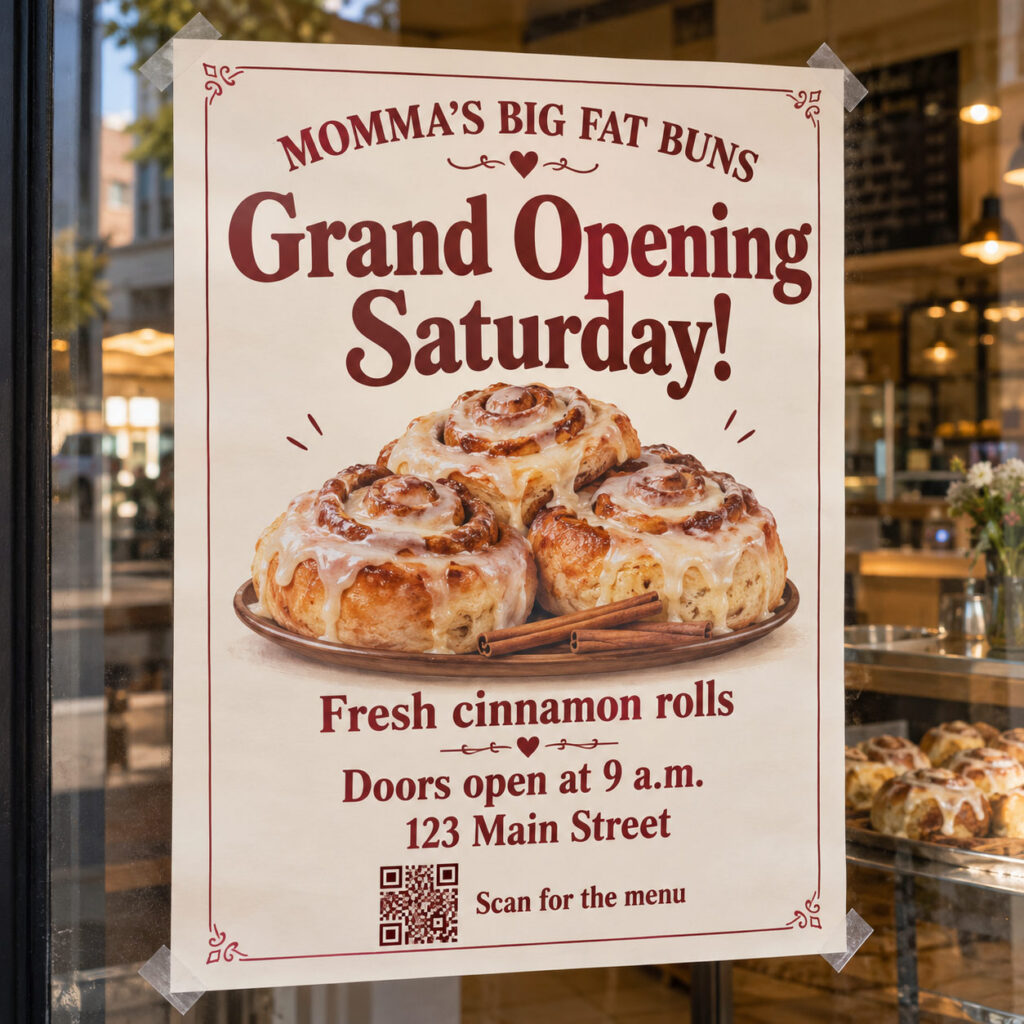
Try these checks before ordering:
- Read it from farther away. Step back from the design. Can you still identify the main message?
- Simplify the text. Move background information to a web page if it crowds the poster.
- Check contrast. Decorative lettering can disappear against a busy photograph.
- Test the QR code. Use a printed sample at the intended code size, with enough clear space around it.
- Give scanning a purpose. “Scan for the menu” tells people what they’ll get.
Tip: A VistaPrint QR code is especially useful when the destination can stay current. You can update a menu or event page without replacing every poster, assuming the printed link still works.
VistaPrint Posters: Paper or foam board
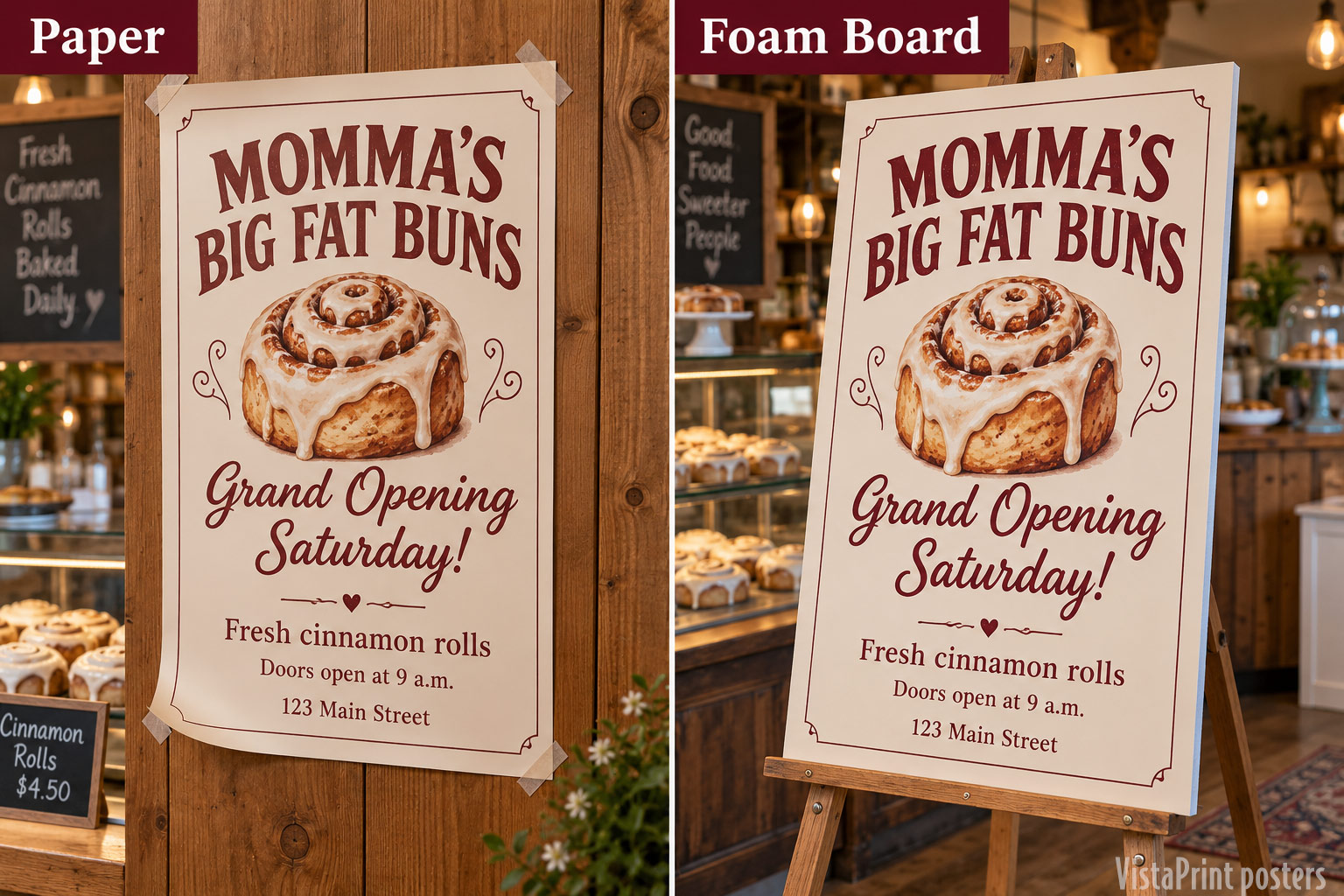
Where will your sign go? A paper poster works well on a wall or in a frame, while a rigid board is a handy choice if you want to prop it on an easel.
For a wedding welcome sign or trade-show display, compare the cost of a poster and mounting supplies with a board that’s ready to display. If you’re just hanging a temporary announcement on the wall, a paper poster may do the job for less.
Tip: Remember to factor in any frame, stand, or mounting supplies along with shipping fees when comparing poster printing costs.
How quickly can VistaPrint deliver posters?
Need your posters in a hurry? VistaPrint offers rush delivery on eligible orders in as few as two business days. Just check the estimated arrival date and select the right shipping option at checkout, as rush delivery isn’t automatically included.
If you’re ordering for an event, give yourself a little breathing room to check the posters when they arrive and sort out any problems. Cutting it close? Compare VistaPrint’s delivery estimate with pickup at a local print shop before placing your order.
VistaPrint posters FAQs
Measure your display space first, then consider how far away readers will stand. Larger displays need larger lettering as well as a larger sheet. If you’re framing the poster, match the frame opening before ordering.
Yes. VistaPrint offers a design upload option. Check the preview and the current specifications for your selected size before approving the order.
Consider the design and lighting. Matte is worth considering for text-heavy posters or places with distracting reflections, while glossy may be best for designs with photos.
Check our current VistaPrint promo codes and compare 2-3 codes at checkout to ensure you are getting the maximum savings for your poster order.
Before you place your VistaPrint poster order

Measure the display space, check the design preview, proofread the details, and make sure the arrival date works. Then compare your eligible VistaPrint discount codes.
A little planning can go a long way toward getting a poster that looks great and gets your message noticed. Before you order, double-check your design and delivery date, then take a look at our latest promo codes to see what you could save.
Thanks for visiting Pretty Sweet!

I’m a dad of four, including 3 kids and a Hungarian Vizsla who is my partner about 22 hours a day. I’m a Philly sports fan and enjoy writing about wellness, saving money, and personal finance. Thanks for reading!